Main navigation

  • Home
  • BikeCAD Pro
  • BikeCAD Online (Free)
  • Design Archive
  • User Guide
  • Help/ FAQ
  • Forum
  • Glossary
  • Cycling Dingbats
  • Upload a BCAD file
  • Release Notes
  • User Map
  • BikeCAD Pro Owners
  • Contact

User account menu

  • Sign up
  • Log in
Home
Bicycle Design Software

BikeCAD Pro How To Forum

If you've got a question about using BikeCAD Pro, the stand alone application for frame builders, bike shops and fit specialists, post it here.

Resources for choosing steel tubing size/diameter?

Danielvetpath
Framebuilder
By Danielvetpath | 8:39 AM EDT, Wed October 12, 2016
BikeCAD Pro How To Forum

Hi: I am enjoying learning to use BikeCAD Pro. My goal is to build a frame/frames for personal/hobby use. At this point, I am planning on using steel tubing. Everything I read suggests custom frame builders will take rider weight and bike riding application (e.g. road vs cross) into consideration when choosing a tube set. I have been looking at bike geometrys online gain insight into frame design.

  • Read more about Resources for choosing steel tubing size/diameter?
  • 2 comments
  • Log in or register to post comments

Sharing configurations between Mac & PC?

armitage
Framebuilder
Hampshire College Center for Design
By armitage | 3:54 PM EDT, Mon October 03, 2016
BikeCAD Pro How To Forum

Maybe this is too bumb to ask, but can the same configuration files be use on both a Mac and PC?

  • Read more about Sharing configurations between Mac & PC?
  • 1 comment
  • Log in or register to post comments

Importing fonts?

Slapshot
Framebuilder
Argyle, TX United States
By Slapshot | 4:44 PM EDT, Mon September 26, 2016
BikeCAD Pro How To Forum

Hey all,

I did a quick glance, but didn't see it covered... How do we input more fonts into the program?

Can anyone break it down in simple, easy to follow instructions for a non tech saavy guy like myself?

Thanks!

DW

  • Read more about Importing fonts?
  • 3 comments
  • Log in or register to post comments

Edit/overwrite custom component?

Tyler
Profile picture for user Tyler
Oakland, CA United States
By Tyler | 4:26 AM EDT, Sun September 25, 2016
BikeCAD Pro How To Forum

I input 'custom' wheel rim and tire dimensions, and saved that particular rim and tire combination into my dropdown menu as a 'standard'.

I then realized I had the entered the wrong overall tire diameter, so I changed it and saved this as another 'standard' set, with a different name; I would have rather edited or overwrote the initial setting(s) I saved.

I'm guessing there may be at least one way to do this, involving pulling up personal configuration data and editing it...

Is there an easier way (any way at all)?

  • Read more about Edit/overwrite custom component?
  • 2 comments
  • Log in or register to post comments

Account for sag?

Danielvetpath
Framebuilder
By Danielvetpath | 2:40 PM EDT, Sun September 18, 2016
BikeCAD Pro How To Forum

If I input "L" for a fox fork (e.g. 527 mm), travel of 120 mm, sag of 24 mm (i.e. 20% sag) and head tube angle of 69 degrees, will final drawing reflect that head tube angle at 20% sag?

Thanks, Daniel

  • Read more about Account for sag?
  • 2 comments
  • Log in or register to post comments

Wheels and Frame stuff

retromike3
Profile picture for user retromike3
Beaverton, OR United States
By retromike3 | 10:42 PM EDT, Fri September 16, 2016
BikeCAD Pro How To Forum

I know I've told you guys up and asked about this, but here we go again. I still need to find out how to turn off the wheels on the horizontal display. It also would be neat if I could turn off the display that shows the wheels on the vertical display or even totally turn off the vertical display I'm also interested in looking at a real sized (100%) image in being able to print that out so I can match it to my tubes on my frame Jig.

  • Read more about Wheels and Frame stuff
  • 1 comment
  • Log in or register to post comments

Font / Logo Dialog box

DMCX
Profile picture for user DMCX
DeMonchaux Bicycles
nagoya, 23 Japan
By DMCX | 10:24 AM EDT, Mon August 08, 2016
BikeCAD Pro How To Forum

Hello,

The box that contains the font option doesn't seems to appear or open anywhere.

I have watched and read your tutorial several times but nothing comes up when I check the boxes that should launch the font/logo text option.

Any hints?

I have the 12.5 version installed on a MacBook Pro 2016 version

  • Read more about Font / Logo Dialog box
  • 2 comments
  • Log in or register to post comments

Handle bar hit point

Cyco
Profile picture for user Cyco
WA Australia
By Cyco | 11:04 PM EDT, Mon August 01, 2016
BikeCAD Pro How To Forum

I know the exact shape of a handle bar isn't always what is modelled, but is it possible to get a dimension that is the point a handle bar would hit the top tube, back from the head tube?

I’m about to build my 1st carbon frame, and wanted to add a few extra layers in that area.

Thanks,

Chris

  • Read more about Handle bar hit point
  • 1 comment
  • Log in or register to post comments

rear brake

Kontorist
Profile picture for user Kontorist
manufaktur für maßfahrräder
Brakel, NW Germany
By Kontorist | 9:47 AM EDT, Tue July 19, 2016
BikeCAD Pro How To Forum

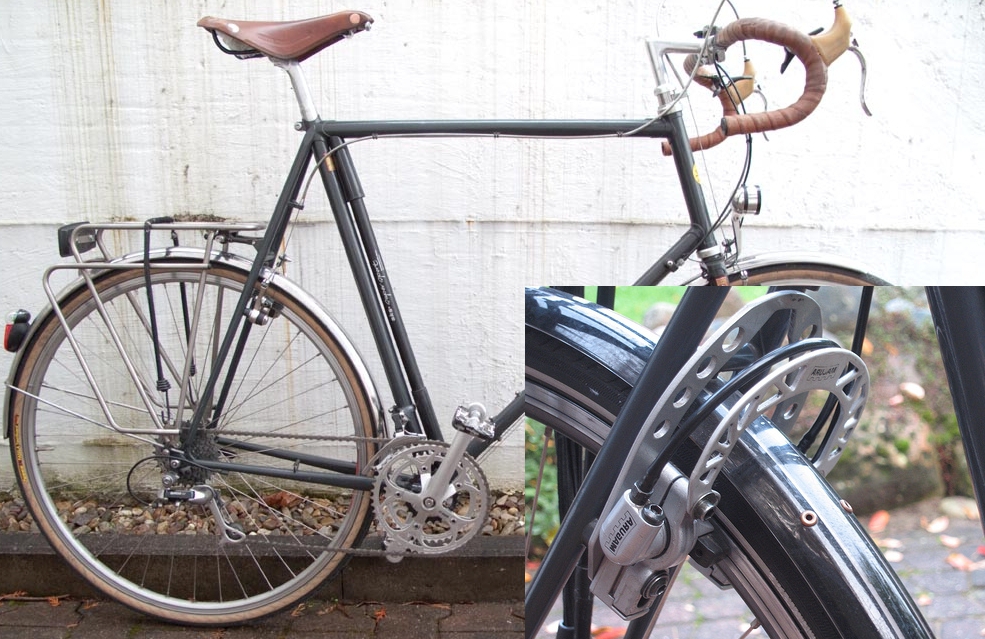
Hi Brent,

Is it possible to set the cantilever boss in front of the rear brake - forwards showing - because it’s a big frames what makes the problems.

Please take a look at the picture.

Thanks

  • Read more about rear brake
  • 2 comments
  • Log in or register to post comments

Paint won't Show

wefunk222
Framebuilder
By wefunk222 | 12:53 AM EDT, Mon July 11, 2016
BikeCAD Pro How To Forum

I am a BikeCAD Pro user and cannot for the life of me figure out how to get paint schemes to show on the frame. I have read all I can in the forum about paint and color and just can't make colors show up on the frame.

MAC user if that matters.

What am I missing?

  • Read more about Paint won't Show
  • 1 comment
  • Log in or register to post comments

Pagination

  • Previous page ‹‹
  • Page 25
  • Next page ››
Subscribe to BikeCAD Pro How To Forum

Copyright © 1998 - 2026 The Bicycle Forest Inc. - All rights reserved

Drupal theme by Alaa Haddad